Browse all help
Guides
Guides for each role
Running it day to day
When something goes wrong
How do I…?
Signing in and the app7
Doing jobs13
- The camera won't open
- How do I do a job and send it for check?
- What makes a good evidence photo?
- A job came back red. How do I fix it?
- It asks for location. What if I'm indoors?
- I have no jobs today. Is that right?
- How do I report a broken bin or a leak?
- It says some fields are still missing
- How do I see the jobs for one bin or machine?
- Why must I scan a sticker before the photo?
- The sticker won't scan or is damaged
- It says the item hasn't been linked yet
- It says Wrong sticker. What do I do?
Checking jobs and running the team10
- How do I add a one-off job?
- How do I check a job: pass it or send it back?
- How do I do a job myself?
- How do I mark a holiday so jobs are not counted as missed?
- A worker registered a new item. How do I approve it?
- How do I give a job to someone else?
- How do I move a job to another day?
- Where do I see what was missed yesterday?
- How do I send a job back so the worker understands?
- How is my team doing today?
Setting up and managing17
- How do I add a worker or supervisor?
- How do I approve today's jobs?
- We added a DG set or a borewell. How do I update our setup?
- How do I turn on a recommended rule?
- How do I prepare and record an annual return?
- How do I move from the free plan to the licensed plan?
- How do I give someone their sign-in code?
- How do I stick and link QR stickers?
- How do I make the monthly report?
- What does Path to green show?
- How do I replace a lost or damaged sticker?
- How do I get the report emailed every month?
- What is setup evidence and how do I finish it?
- How do I share documents with an inspector?
- Someone left. What do I do?
- How do I upload a licence and get renewal reminders?
- How do I check my waste vendor's licence?
Collection, intake and gate7
By type of organisation
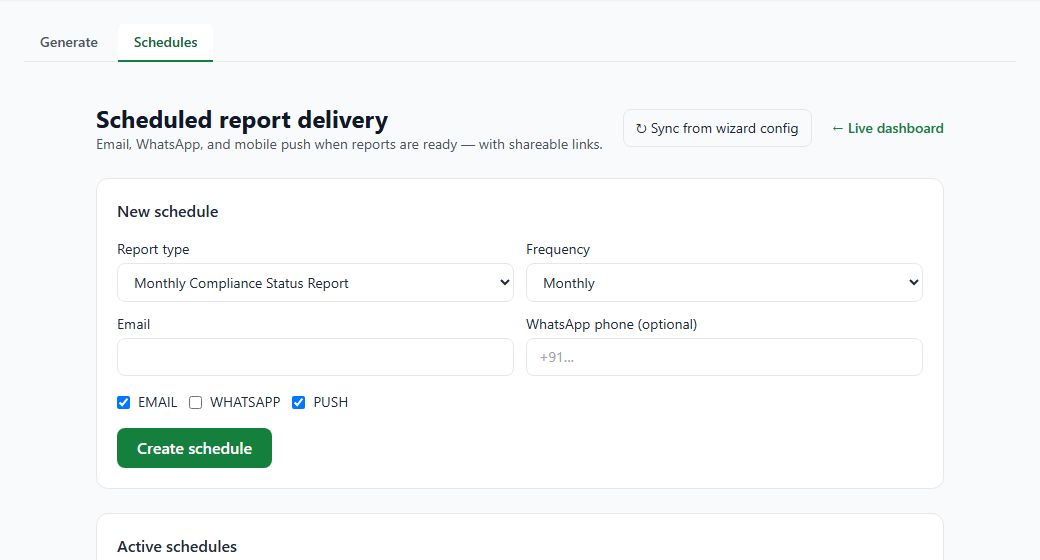
How do I get the report emailed every month?
Manager
- Open Report Schedules.
- Under New schedule, choose the report, how often, and who receives it.
- Click Create schedule.
More detail: Month-end and year-end
Related
Did this answer your question?